> ## Documentation Index
> Fetch the complete documentation index at: https://docs.deploystack.io/llms.txt
> Use this file to discover all available pages before exploring further.
# Architecture Overview
> Complete architectural overview of DeployStack's Control Plane / Data Plane system for enterprise MCP management
DeployStack transforms MCP from individual developer tools into enterprise-ready infrastructure through a sophisticated **Control Plane / Satellite architecture**. Our platform eliminates installation friction, provides secure credential management, and offers complete organizational visibility for teams of any size.
## The Problem: MCP Without Management
Traditional MCP implementation creates significant organizational challenges:
### Configuration Hell
* **Manual Setup**: Developers spend hours configuring each MCP server with complex JSON files
* **Environment Variables**: API keys and tokens scattered across local `.env` files and shell configurations
* **Inconsistent Environments**: "Works on my machine" problems due to configuration drift across team members
### Security & Compliance Gaps
* **Credential Sprawl**: API keys shared via Slack, email, or committed to version control
* **Zero Visibility**: Organizations have no insight into which MCP tools are being used or by whom
* **No Access Control**: Anyone can run any MCP server locally without oversight
### Operational Chaos
* **Onboarding Friction**: New team members need days to set up all required MCP tools
* **Tool Discovery**: Developers waste time finding and configuring tools individually
* **No Standardization**: No central catalog or approved tool list for organizational use
## The Solution: MCP-as-a-Service
DeployStack introduces a **Control Plane / Satellite architecture** that brings enterprise-grade management to the MCP ecosystem with zero installation friction through managed satellite infrastructure.
## Core Components
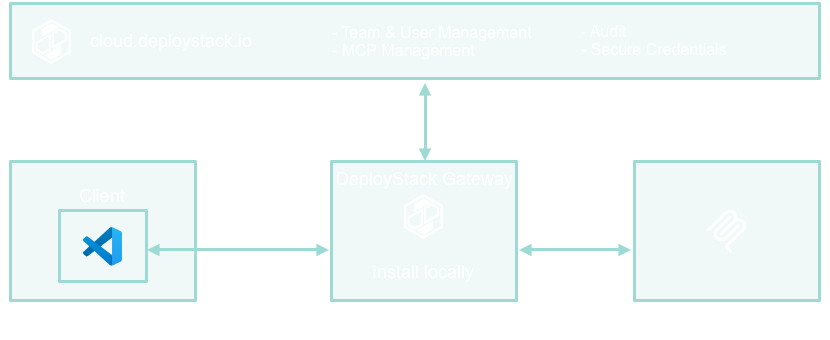
**cloud.deploystack.io** - Centralized management platform for teams, credentials, and MCP server configurations
**Global & Team Satellites** - Managed MCP infrastructure providing instant access with zero installation
**Simple URL Configuration** - VS Code, Claude, and other MCP clients connect via HTTPS URL with OAuth
### Control Plane: cloud.deploystack.io
The cloud-based control plane provides centralized management for all MCP infrastructure:
#### Team & Access Management
* **Role-Based Access Control**: [Define teams](/general/teams), [roles, and permissions](/general/roles) for MCP server access
* **Centralized User Management**: Single source of truth for team membership and access rights
* **Policy Enforcement**: Granular control over which teams can access which MCP servers
#### Secure Credential Vault
* **Encrypted Storage**: All API keys and tokens stored with [enterprise-grade encryption](/general/security)
* **Zero-Exposure Model**: Developers never directly handle credentials
#### MCP Server Catalog
* **Configuration Management**: [Store and manage all MCP server configurations](/general/mcp-catalog) including commands, arguments, and environment variables
* **Version Control**: Track changes to MCP server configurations over time (coming soon)
#### Analytics & Governance (Coming soon)
* **Usage Analytics**: Track which developers use which MCP servers and how frequently
* **Cost Tracking**: Monitor expensive API usage across teams and optimize spending
* **Audit Trails**: Complete logging of all MCP server interactions for compliance
### Satellite Infrastructure: Global & Team Satellites
The satellite infrastructure provides managed MCP services through two deployment models:
#### Global Satellites (Managed by DeployStack)
* **Zero Installation**: Access via simple HTTPS URL configuration
* **Auto-Scaling**: Handles traffic spikes automatically
* **Multi-Region**: Low-latency global availability
* **Fully Featured**: Complete MCP server access and team management
#### Team Satellites (Customer-Deployed)
* **On-Premise Deployment**: Within corporate networks for internal resource access
* **Complete Team Isolation**: Linux namespaces and cgroups for security
* **Internal Resources**: Connect to company databases, APIs, file systems
* **Enterprise Security**: Full compliance and governance controls
#### OAuth Authentication
* **Standard OAuth Flow**: Client credentials generated in dashboard
* **Secure Token Exchange**: Standard Bearer Token authentication
* **Team-Aware Access**: Credentials scoped to specific teams and permissions
* **Zero Credential Storage**: No local credential management required
## Protocol Flow
### 1. OAuth Client Setup
* Developer creates OAuth client credentials in cloud.deploystack.io dashboard
* Client ID and Secret generated for secure satellite access
* No software installation or local authentication required
### 2. VS Code Configuration
**Simple URL Configuration**:
```json theme={null}
{
"mcpServers": {
"deploystack": {
"url": "https://satellite.deploystack.io/mcp",
"oauth": {
"client_id": "deploystack_mcp_client_abc123def456ghi789",
"client_secret": "deploystack_mcp_secret_xyz789abc123def456ghi789jkl012"
}
}
}
}
```
### 3. Satellite Connection
**Connection Flow**:
1. **OAuth Authentication**: Client credentials validated against control plane
2. **Team Resolution**: User's team memberships and permissions retrieved
3. **Tool Discovery**: Available MCP tools based on team configuration
4. **Request Processing**: All tool requests processed through managed satellite infrastructure
### 4. Request Processing
```
Client Request → OAuth Validation → Team Authorization → Satellite MCP Processing → Response
```
## Security Architecture
DeployStack implements enterprise-grade security across all components of the platform. For comprehensive security details including credential management, access control, and compliance features, see our [Security Documentation](/general/security).
Key security principles:
* **OAuth Bearer Token Authentication**: Standard OAuth flow with secure credential management
* **Team Isolation**: Complete separation between team resources and data
* **Managed Infrastructure**: Enterprise-grade security controls in satellite infrastructure
## Performance Optimization
### Managed Satellite Infrastructure
Unlike local installations, DeployStack uses managed satellite infrastructure:
* **Instant Availability**: All tools immediately available without local setup
* **Auto-Scaling**: Satellite infrastructure scales automatically with demand
* **Global Distribution**: Multiple regions for low-latency access worldwide
* **Zero Maintenance**: No local processes to manage or update
### Caching Strategy
DeployStack implements sophisticated caching mechanisms in satellite infrastructure for optimal performance. Caching is managed transparently by the satellite infrastructure with no local configuration required.
## Enterprise Features
### Organizational Visibility (Coming soon)
* **Real-Time Analytics**: Live dashboard showing MCP server usage across the organization
* **Cost Optimization**: Track expensive API usage and identify optimization opportunities
* **Resource Planning**: Understand which tools drive the most value for different teams
### Compliance & Governance (Coming soon)
* **Audit Logging**: Complete trails of all MCP server interactions
* **Policy Enforcement**: Centralized policies automatically enforced at the satellite level
* **Access Reviews**: Regular reviews of team access to sensitive MCP servers
### Operational Controls (Coming soon)
* **Centralized Updates**: Push MCP server configuration changes to all team members
* **Emergency Disable**: Instantly disable problematic MCP servers across the organization
* **Health Monitoring**: Real-time monitoring of MCP server performance and availability
## Team Context Switching
DeployStack supports multiple team memberships with instant context switching:
**Team Switch Process** (via dashboard):
1. **Select Team**: Choose different team in cloud.deploystack.io dashboard
2. **Generate New OAuth Credentials**: Create new client credentials for the team
3. **Update Configuration**: Replace OAuth credentials in VS Code configuration
4. **Instant Access**: New team's MCP tools immediately available
## Deployment Models
### Cloud-Native (Default)
* **Control Plane**: Hosted at cloud.deploystack.io
* **Satellite Infrastructure**: Managed global satellites with optional team satellites
* **Benefits**: Zero installation friction, automatic updates, shared team configurations
### Self-Hosted Enterprise
* **Control Plane**: Deployed in customer's infrastructure
* **Team Satellites**: Customer-deployed satellites within corporate networks
* **Benefits**: Complete data sovereignty, custom compliance requirements, air-gapped environments
## Development Workflow
### Before DeployStack
```bash theme={null}
# Developer manually configures each MCP server
1. Find MCP server documentation
2. Install server individually (npm install @github/mcp)
3. Obtain API credentials from various sources
4. Configure complex JSON in VS Code settings
5. Debug configuration issues
6. Repeat for each team member
```
### After DeployStack
```bash theme={null}
# Zero installation setup for entire team
1. Register at cloud.deploystack.io
2. Create OAuth client credentials
3. Add URL to VS Code configuration
4. # Done! All authorized tools available immediately
```
**VS Code Configuration**:
```json theme={null}
{
"mcpServers": {
"deploystack": {
"url": "https://satellite.deploystack.io/mcp",
"oauth": {
"client_id": "your_client_id",
"client_secret": "your_client_secret"
}
}
}
}
```
## Monitoring & Observability (Coming soon)
### Satellite Metrics
* **Infrastructure Health**: Real-time status of satellite infrastructure
* **Request Throughput**: Performance metrics for tool usage
* **Error Rates**: Failure detection and automatic recovery
* **Resource Usage**: Satellite resource consumption and scaling
### Cloud Metrics
* **Team Activity**: Organization-wide usage patterns and trends
* **Cost Analysis**: API usage costs and optimization recommendations
* **Security Events**: Authentication, authorization, and policy violations
* **Performance Analytics**: Satellite performance across teams and regions
## Benefits Summary
### For Developers
* **Zero Installation**: One URL configuration, then everything works
* **Instant Access**: All team tools immediately available
* **Consistent Environment**: Identical setup across all team members
* **No Credential Management**: OAuth handles all authentication securely
### for Organizations
* **Complete Visibility**: Know what MCP tools are used, by whom, and how often (coming soon)
* **Security Control**: Centralized credential management and access policies
* **Cost Optimization**: Track and optimize expensive API usage (coming soon)
* **Compliance Ready**: Full audit trails and governance controls (coming soon)
### For Administrators
* **Central Management**: Single dashboard for entire MCP ecosystem
* **Policy Enforcement**: Granular control over tool access by team and role
* **Instant Deployment**: Push configuration changes to all team members (coming soon)
* **Operational Insights**: Real-time monitoring and analytics (coming soon)
**MCP-as-a-Service**: DeployStack transforms MCP from individual developer tools into enterprise-ready infrastructure with zero installation friction, providing the security, governance, and operational control that organizations need while maintaining the developer experience that teams love.
***
**Next Steps**: Explore our [Quick Start Guide](/general/quick-start) to experience the architecture in action, or dive into the [Development Documentation](/development) to understand implementation details.